On Tuesdays the desks are full, on Fridays many stay empty. AppjePlekje shows how many spots are booked per day and by which teams. That way you see where there is room to spare and where it is tight. With check-in you also see how many people actually come.
DEKRA's 80 employees in Alkmaar work partly from home and partly at the office. They book their desk and parking space through AppjePlekje, so DEKRA knows in advance how many people are coming in. With that insight the company was able to reduce its office space to a single floor.

Giving up a floor or looking for extra space is a big decision. You want to know how the office is used over a longer period.
Walking round the office you see which desks are taken. But is it this busy every Tuesday, or is there just a team meeting today?
Ask how often someone works at the office and you usually get an estimate. For a decision about office space you need something firmer.
With an average occupancy of sixty percent there seems to be plenty of room to spare. Yet on the busiest days every spot can be taken. That is why you also want to know how high the peaks are.
Colleagues book a desk for the day they come to the office. AppjePlekje adds up those bookings and shows which days are busy and where spots are left over.
Plans can change. With check-in you record whether someone is actually at the office. That can be done manually in the app or on the computer. Automatic check-in is also possible, for example through a linked access badge, the location of the phone, the desktop app or a desk sensor.
Colleagues book their spot and immediately see who else is coming that day. With automatic check-in they do not have to do anything else. Anyone who checks in manually confirms their presence in the app or on the computer.
Employees want to know what is tracked and what you use the figures for. The reports show numbers and patterns, not employee names. Do you use the phone to check in automatically? The phone itself determines whether someone is near the office. The location is not sent to AppjePlekje.
Choose a location and view the last 30 days, 90 days or the past year. You can drill down by floor, group or type of spot. Next to the figures you see the change compared with the previous period.
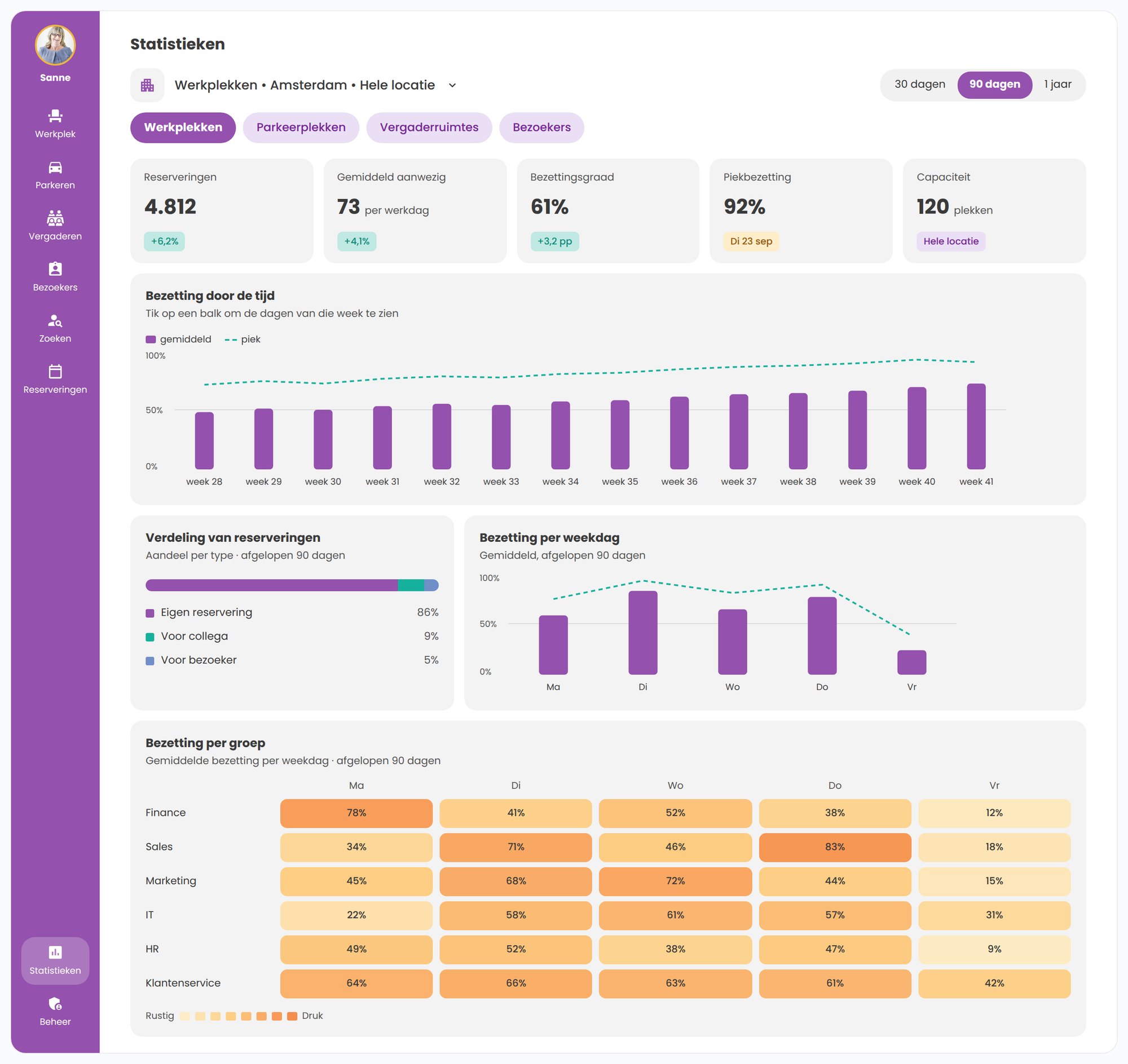
Tuesday is the busiest day. Look at which teams come in then and whether they could arrange to come in on a quieter day.
Finance mostly books on Monday, Sales on Thursday. You see which days are popular and when teams are in the office at the same time.
Could you manage with fewer spots? First check how many are needed on the busiest days.
You see how many spots are booked, how many people are present on average and how that compares with the available space. The peak occupancy and the average number of office days per employee are also in the dashboard.
The chart shows the average occupancy and the peaks. Click a week to see the individual days.
With check-in you can compare bookings with attendance.
The dashboard shows how many spots were released automatically because someone did not check in, and how many of those were booked again. You also see what share of check-ins was confirmed by an access badge, phone or desk sensor.
Which teams come in on the same days? And when is there still room? The heatmap shows occupancy per group and per weekday.
Click a cell for the number of bookings and the available capacity. Days on which a group may not book do not count as empty days.
Some spots stay empty almost all the time. Others are only needed on busy days. The dashboard shows that difference, so you can judge how much space you need.
You also see which spots are always booked by the same person, without a name being shown. Useful if you want to know whether your flexible desks are really that flexible in practice.
For desks, parking spaces and shared bikes you view occupancy per part of the day. For meeting rooms you measure use in 15-minute blocks within your office hours. You also see how long meetings last and how many people take part. For visitors the dashboard shows the number of visits and arrivals.
Is part of the office rarely used? Check whether the remaining spots are also enough on busy days. That lets you back up a proposal for less office space.
If many teams come in on the same day, you can agree on their office days with them. With a maximum per group and per weekday you share out the available spots.